
ELECOM ESH-IR01GAWH Smart Infrared Remote Control User Manual

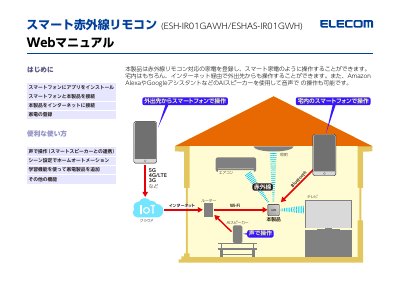
This product can control home appliances through a smartphone APP, realize remote control, voice control, scene setting and other functions

ELECOM ESH-IR01GAWH Smart Infrared Remote Control User Manual - cover page
Brand
Elecom
Category
Other Electronics
Document type
User Manual
Language
Japanese
Pages
25
File format
PDF
File size
2.7 MB
Published
18 October, 2023
Updated
18 October, 2023
MD5 checksum
6DECD511536071EFAC7CFA12879B3E21

About this manual

This document is the user manual for the ELECOM ESH-IRO1GAWH Smart Infrared Remote Control. It details the setup process, including downloading the 'ELECOM Smart App' on a smartphone, connecting the device to the internet via Wi-Fi, and pairing it with the mobile device using Bluetooth. The guide also covers registering compatible home appliances and utilizing voice control features through smart speakers. This manual is written in Japanese.

What's inside

  • Introduction
  • Installing the App
  • Connecting Smartphone
  • Connecting to Internet
  • Registering Appliances
  • Voice Control
  • Learning Function

Frequently asked questions

How do you connect the remote to the smartphone?

Turn on Bluetooth on the smartphone, then tap the BT button on the remote when the BT lamp is blinking orange.

What is required to register a device with the remote?

Use the '学習機能' to teach the remote the device's infrared signal.

What is the model number of the remote?

The model number is ESH-IRO1GAWH.

Download PDF (2.7 MB)

More Elecom Manuals


View all Elecom manuals →