
Diebold Nixdorf CrypTA USB Dongle Quick Start Guide

This is a quick start guide about using CrypTA USB Dongle
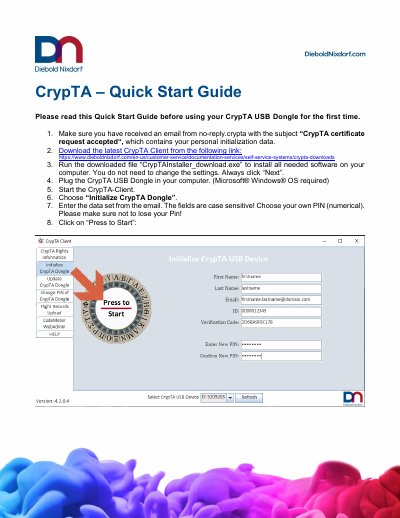

Diebold Nixdorf CrypTA USB Dongle Quick Start Guide - cover page
Brand
DIEBOLD NIXDORF
Category
Other Computer Accessories
Document type
Quick Start Guide
Language
English
Pages
4
File format
PDF
File size
660 KB
Published
18 October, 2023
Updated
18 October, 2023
MD5 checksum
2985F8609BDD60A608B86AD2862687FB

About this manual

This Quick Start Guide explains how to set up the CrypTA USB Dongle for the first time. It details the process of downloading and installing the CrypTA Client software, initializing the dongle using personal initialization data received via email, and setting a PIN. The guide also notes that Microsoft Windows OS is required for operation.

What's inside

  • Initialization
  • Software Installation
  • Update Rights
  • Client Components
  • Support Contact

Frequently asked questions

How often must the CrypTA Rights be updated?

You have to update the CrypTA Rights at least every 90 days.

What happens if I do not update the rights?

An email reminder will be sent two weeks before the CrypTA Rights on the Dongle get invalid.

What operating system is required for the CrypTA USB Dongle?

Microsoft Windows OS is required.

Download PDF (660 KB)

More DIEBOLD NIXDORF Manuals


View all DIEBOLD NIXDORF manuals →