
This document is an introduction to the ProtoCessor ProtoNode Quick Setup Guide, which introduces the functions and usage methods of ProtoCessor's two DIP switches.
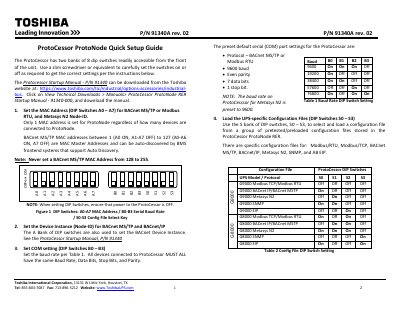
This document serves as a quick setup guide for the Toshiba ProtoNode, an industrial accessory. It provides instructions on configuring the device's two banks of eight DIP switches to set MAC addresses, device instance IDs, and serial communication baud rates. Users are instructed to ensure power is off while adjusting the switches.
| DIP Switch Banks | Two banks of 8 dip switches |
|---|---|
| Supported Protocols | BACnet MS/TP, Modbus RTU, BACnet/IP, Metasys N2, SNMP, AB EIP |
| Default Baud Rate for Metasys N2 | 9600 baud |
Only one MAC address is set for the ProtoNode regardless of how many devices are connected to it.
Power to the ProtoCessor must be OFF when setting the DIP switches.