
This document mainly introduces the functions and usage of the remote control.
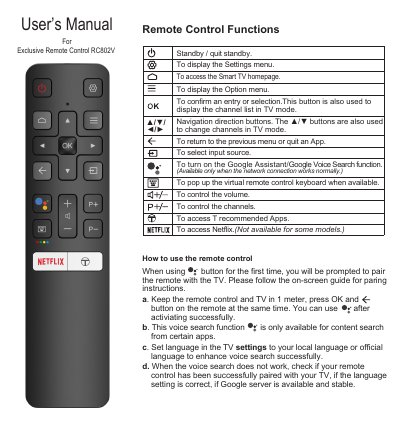
This document provides instructions for the TCL RC802V remote control, detailing the functions of various buttons such as Standby, Settings, Navigation, and Voice Search. It explains how to pair the remote with a TV for the first time and how to use the built-in microphone for voice commands.
| Remote Control size | 154.6mm x 37.9mm x 16.4mm |
|---|---|
| Communication methods | RF2.4G |
| Adaptive Weight | 0.05kg |
| RF Operating distance | >15m |
| IR Operating distance | >10m |
| Voice search current | 10mA |
| Battery type | Zn/MnO2 |
| Battery capacity | 1000mAh |
Keep the remote control and TV in 1 meter, press OK and the button on the remote at the same time, then follow the on-screen guide.
The RF operating distance is greater than 15 meters and the IR operating distance is greater than 10 meters.
The remote requires two AAA batteries with a type of Zn/MnO2.