
The document introduces the interfaces and connections of a motherboard named AX4B-G2N, as well as the hardware and features supported by the motherboard.
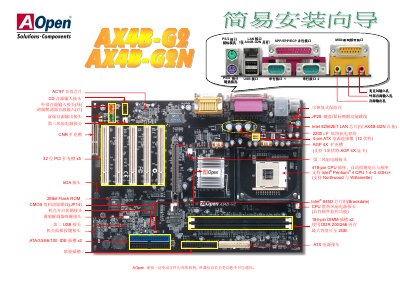
This user manual is for the AOpen AX4B-G2N motherboard, which uses a 478-pin CPU socket for Intel Pentium 4 processors, two 184-pin DIMM slots for DDR 200/266 memory up to 2GB, and the Intel 845D chipset.
It provides installation steps for the ATX power supply, CPU, cooling fans, IDE and floppy drives, chassis panel headers, USB and IrDA headers, and audio connectors. The AX4B-G2N model also includes an Intel 82562ET LAN chip, and the manual explains how to clear CMOS data using jumper JP14. This manual is written in Chinese.
| CPU socket | 478-pin |
|---|---|
| Supported processor | Intel Pentium 4 1.4~2.4GHz |
| Memory slots | 2 x 184-pin DIMM |
| Memory type and capacity | DDR 200/266, up to 2GB |
| Chipset | Intel 845D (Brookdale) |
| AGP slot | AGP 4X |
| PCI slots | 5 x 32-bit PCI |
| LAN controller | Intel 82562ET (AX4B-G2N only) |
| Network speed | 10/100 Mbps |
Move the jumper cap to pins 2-3 of JP14 to short it for several seconds, then return it to its original position.
Yes, the AX4B-G2N model has an Intel 82562ET LAN chip providing 10/100 Mbps transmission.
It supports DDR 200/266 memory with a maximum capacity of 2GB.
The motherboard needs a 20-pin and a 4-pin power connector; install the 4-pin connector first, then the 20-pin connector.