
The HD-F01-RX is a fiber optic extender that supports synchronous output of VGA, HDMI, and audio signals.
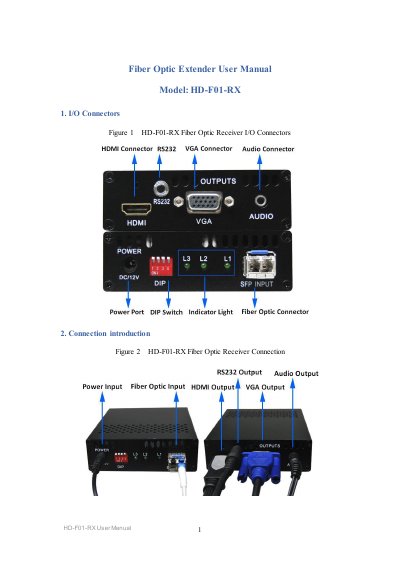
The document provides instructions on connecting the HD-F01-RX fiber optic receiver to single-mode optical fibers and configuring its I/O connectors. It details how to set output resolutions using DIP switches or a serial port configuration tool, supporting simultaneous VGA, HDMI, and audio signal outputs.
The guide also explains indicator light states for monitoring input signals (HDMI/VGA) and normal operation. Finally, it outlines the steps for applying power and adjusting parameters via a dedicated software tool to manage resolution settings.
| Power Supply | 12V/2A |
|---|---|
| Supported Resolutions (HDMI) | 800x600@60Hz, 1920x1080@60Hz |
| Supported Resolutions (VGA) | 800x600@60Hz, 1920x1080@60Hz |
| Audio Output Modes | Analog audio through 3.5 mm ear jack; HDMI audio output |
You can configure the resolution using DIP switches or via a serial port configuration tool.
Yes, the device supports simultaneous output of these signals.
A single-mode optical fiber must be connected to the right port.