
The HD-1000 Series Handheld Thermometer User Manual provides functions, specifications, operation instructions, and accessory details for the HD-1000…
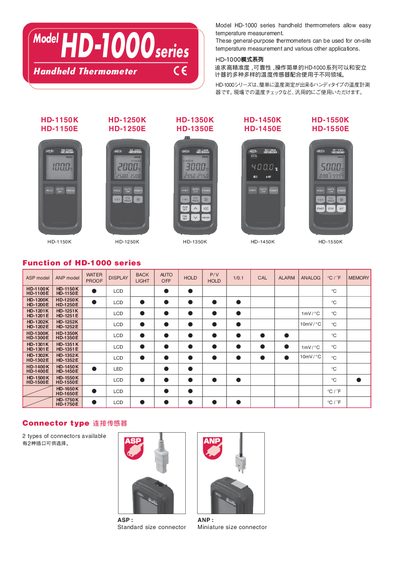
The HD-1000 series handheld thermometers are general‑purpose devices for on‑site temperature measurement. They support multiple connector types (HD‑1150K, HD‑1150E, etc.) and feature waterproof protection equivalent to IPX5, backlight, memory function, auto power‑off, and alarm output.
The manual describes how to operate the thermometer, adjust resolution, change temperature units, use the memory function, and connect optional analog or alarm output cables. It also lists technical specifications, supplied accessories, and optional accessories such as AC adapters and protective cases.
| Waterproof rating | IPX5 |
|---|---|
| Memory capacity | 9999 data points |
| Battery life (AA batteries) | 300 h |
| Dimensions (W × H × D) | ≈ 76 mm × 167 mm × 36 mm |
| Weight | ≈ 350 g |
| Analog output scale | 1 mV/°C (or 10 mV/°C) |
| Output impedance | 100 Ω |
The thermometer automatically turns the power off after 5 minutes of inactivity.
It meets the IPX5 rating, protected against water jets from all angles.
The memory can store up to 9 999 data points.