
AN1794 is STMicroelectronics application note about PractiSPIN evaluation system configuration and set up
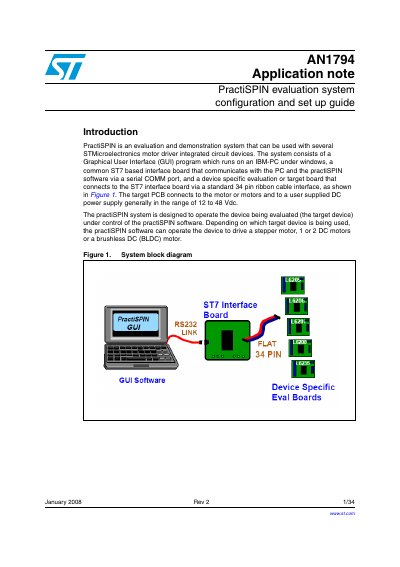
The PractiSPIN evaluation system is designed to test and demonstrate several STMicroelectronics motor driver integrated circuits. The system consists of a Graphical User Interface (GUI) running on an IBM-PC under Windows, a common ST7-based interface board, and device-specific target boards that connect via a standard 34-pin ribbon cable.
| Supported Motor Types | Stepper, 1 or 2 DC motors, Brushless DC (BLDC) motor |
|---|---|
| Power Supply Range | 12 to 48 Vdc |
| Interface Connector | Standard 34 pin ribbon cable |
Calibration is a two-step process: first null out the offset by adjusting R18, then set the maximum current using the Vref potentiometer.
The software can operate the device to drive a stepper motor, one or two DC motors, or a brushless DC (BLDC) motor.
The target PCB connects to a user supplied DC power supply generally in the range of 12 to 48 Vdc.
If the potentiometers are set to full scale (clockwise) the reference applied to the input of the device is typically about 0.88 V.