
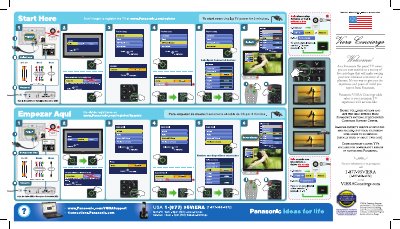
Panasonic VIERA TV First Time Setup Guide


Panasonic VIERA TV First Time Setup Guide - cover page
Brand
Panasonic
Category
Television
Document type
User Manual
Language
English
Pages
1
File format
PDF
File size
8.1 MB
Published
03 August, 2012
Updated
24 August, 2012
MD5 checksum
B78DA1DB556DE6A3EF4BEEB1F34BBD7B

About this manual

This document serves as a quick reference for the first-time setup of a Panasonic VIERA flat panel television. It outlines the initial menu options available to the user, such as selecting the language, setting the clock, configuring the antenna or cable source, and labeling input ports. The guide includes visual cues for navigating the on-screen menu to complete these essential configurations.

What's inside

  • First time setup
  • Language selection
  • Clock setup
  • ANT/Cable setup
  • Input labels
  • Auto program
  • VIERA Concierge
  • Customer Support

Frequently asked questions

How do I reset the TV setup if I need to start over?

To start over, unplug the TV power for 3 minutes.

How do I label my input ports?

Navigate to the Input labels menu to assign names like Component 1, HDMI 1, and Video 1 to your connections.

Download PDF (8.1 MB)

More Panasonic Manuals


View all Panasonic manuals →