
Dell™ 1201MP Projector Setup Guide, including safety instructions and connection instructions
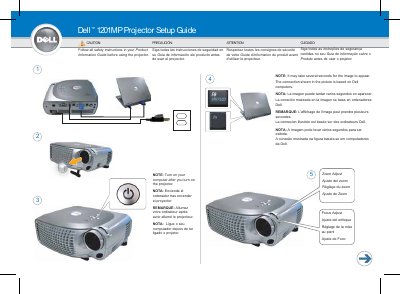
The document serves as a quick setup guide for the Dell 1201MP projector. It includes multilingual safety warnings advising users to read the Product Information Guide before use, along with notes on image appearance delays and computer connection requirements.
The guide details the functions of the remote control buttons, listing twelve specific controls including Power, Video Mode, Menu, Aspect Ratio (4:3/16:9), Keystone Correction, Source, Volume, and navigation buttons. It also specifies that a USB cable must be connected to use page navigation features on the remote.
It may take several seconds for the image to appear.