
This document describes the basic operation and advanced functions of the Sekonic L-358 LCD display. It includes setting DIP switches, selecting ambient mode, multi-flash mode, quick guide, etc. Additionally, the document also introduces the product's memory function and other advanced features.
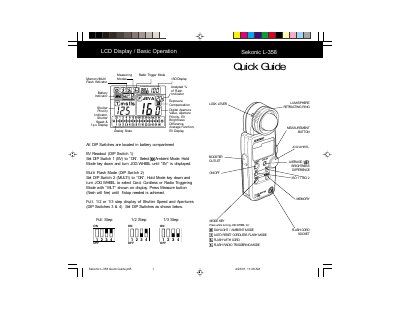
The Sekonic L-358 is a light meter designed for photography and videography. It features a digital and analog display, allowing users to measure incident, reflected, and ambient light. The device supports various measuring modes including Full Step, 1/2 Step, and 1/3 Step, with options for EV readout and shutter priority. This manual is written in Chinese.
| Memory Storage | Up to nine readings can be stored |
|---|---|
| Memory Recall | A tenth measurement can also be displayed |
| Brightness Difference | +/- 1/10th steps of EV |
| Exposure Compensation Range | +/- 9.9 EV |
| Calibration Range | +/- 1.0 EV |
Press and hold both MODE and MEMORY keys, then turn the JOG WHEEL to view individual stored memory readings.
After storing two or more measurements, toggle the AVE./ key to display the averaged exposure in digital and analog readouts.
Turn the meter off, tap the power button once while holding ISO 1 and ISO 2 keys until CAL is displayed, then adjust using the JOG WHEEL.