
Cisco Unity Express for Cisco CallManager Task Overview

This document provides instructions on how to install the Cisco Unity Express Network Module or AIM on the Cisco 3745 router
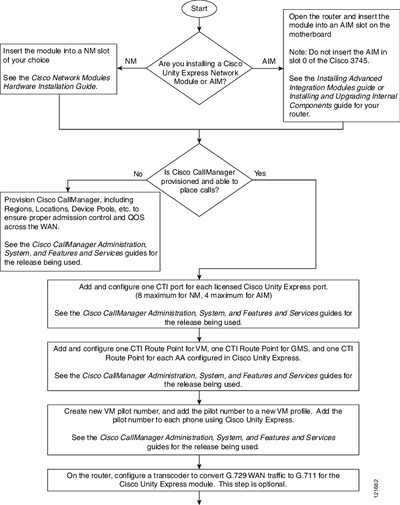

Cisco Unity Express for Cisco CallManager Task Overview - cover page
Brand
Cisco
Category
Other Electronics
Document type
User Manual
Language
English
Pages
2
File format
PDF
File size
34 KB
Published
09 July, 2012
Updated
30 September, 2023
MD5 checksum
FDCA8585DB237A4FC267FCA5AD2A9CF9

About this manual

This document outlines the tasks required to install the Cisco Unity Express Network Module or AIM into a router. It provides a decision flow for determining if Cisco CallManager is properly provisioned before proceeding with configuration steps.

What's inside

  • Insert the module
  • Provision Cisco CallManager
  • Add and configure CTI ports
  • Create VM pilot number
  • Configure transcoder
  • Configure access lists
  • Configure IP connectivity
  • Upgrade software

Frequently asked questions

Where should I insert a Cisco Unity Express Network Module?

Insert the module into an NM slot of your choice.

How many CTI ports can be configured on an AIM?

You can configure up to 4 maximum for AIM.

Download PDF (34 KB)

More Cisco Manuals


View all Cisco manuals →