
Cisco Unity Express Task Overview for CallManager Express

This document describes how to use the Cisco Unity Express Network Module AIM.

Cisco Unity Express Task Overview for CallManager Express - cover page
Brand
Cisco
Category
Other Electronics
Document type
Installation Guide
Language
English
Pages
2
File format
PDF
File size
30 KB
Published
09 July, 2012
Updated
30 September, 2023
MD5 checksum
EEB497C8A6A4E118F6DCC159B6D38D02

About this manual

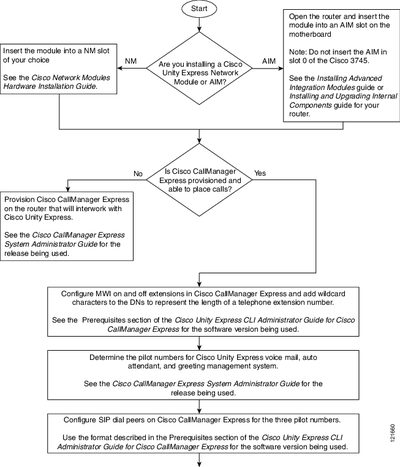
This document outlines the prerequisites and initial tasks required to install a Cisco Unity Express Network Module (NM) or Advanced Integration Module (AIM). It details the steps for inserting the module into a router, such as avoiding slot 0 on a Cisco 3745, and verifying that the associated Cisco CallManager Express is provisioned.

What's inside

  • Inserting the module
  • Prerequisites
  • Configuring SIP dial peers
  • Configuring IP connectivity
  • Running the Initialization Wizard

Frequently asked questions

Which slots should be avoided when installing an AIM in a Cisco 3745?

Do not insert the AIM in slot 0 of the Cisco 3745.

How do you verify the software version after installation?

Enter the command 'show software versions' from the router.

Download PDF (30 KB)

More Cisco Manuals


View all Cisco manuals →