
Optical lens cleaning using compressed air. 1. Power Camera. 2. Eject Disc compartment. 3. Remove power from camera. 4. Open side panel by loosening 5 screws. Fig.1 5. Spray compressed air into optical lens area. Fig.2 and Fig.3 6. Close side panel by tightening screws from step 4. Fig.1 7. Test and resume normal operation.
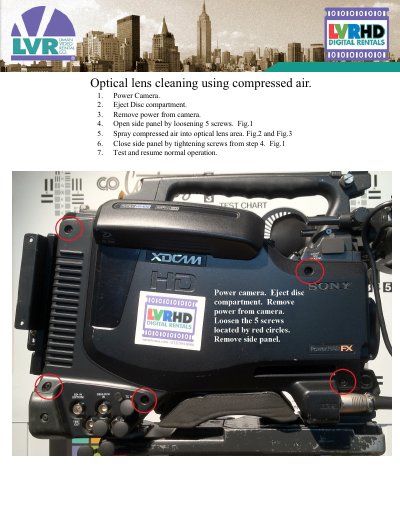
This guide provides instructions for cleaning the optical lens of a Sony camera using compressed air. The process involves powering off the device and removing the side panel to access the lens area.
You must remove power from the camera and eject the disc compartment.
You need to loosen 5 screws located by red circles.
The optical lens is behind the housing in the circled area.