
This document is the installation manual for the E62405SP projector, which mainly introduces the connection method of the projector, power interface, interface description, etc., and provides a quick installation card.
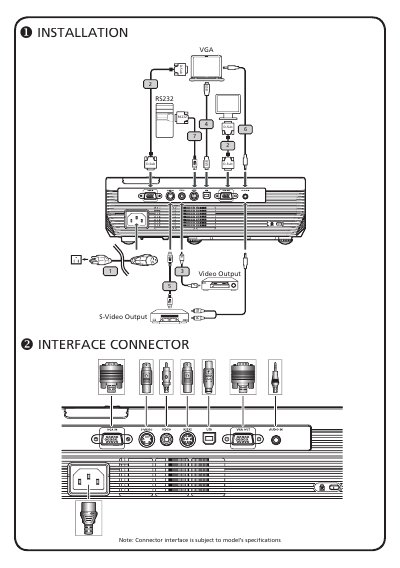
This document serves as a Quick Start Guide for the NINTEDNO DS Pokemon Diamond Version. It outlines the necessary cables for installation, including VGA, Composite Video, USB, S-Video, Audio, and RS232 connections, noting that connector interfaces are subject to model specifications.
The guide provides step-by-step instructions for connecting the device to a computer, powering the unit on and off, and adjusting the display settings such as position, focus, and zoom to run presentations.
You must use a VGA cable and a power cord to connect the device to a computer and an electrical outlet.
You need to press the power button twice to shut down the device.