
This document describes the connection method and power on and off method of a projector of a certain brand.
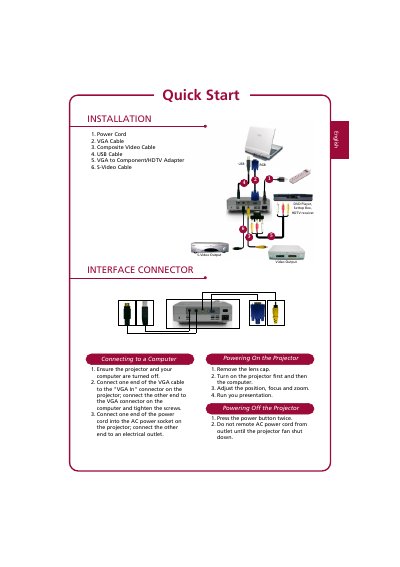
This document serves as a quick start guide for a projector. It lists the contents of the package, including power cords, VGA cables, composite video cables, USB cables, adapters, and S-Video cables.
The guide provides step-by-step instructions for connecting the projector to a computer using a VGA cable and securing it with screws. It also outlines the correct sequence for powering on (projector first, then computer) and off (press power button twice), along with warnings about removing the power cord only after the fan stops.
You must turn on the projector first and then turn on the computer.
You need to press the power button twice to turn off the projector.
Do not remove the AC power cord from the outlet until the projector fan has shut down.