
This document provides quick start guide of projector, introduces how to connect projector to other devices and how to power on/off projector
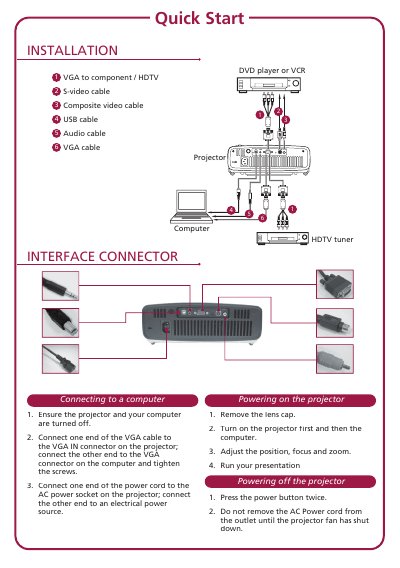
This document serves as a quick start guide for the NINTEDNO DS Pokemon Black Version projector. It details the necessary cables for connection, including VGA, S-video, composite video, USB, and audio cables, as well as compatibility with DVD players, VCRs, and HDTV tuners.
The guide provides step-by-step instructions for connecting the projector to a computer using a VGA cable and for powering the device on and off. It also includes specific operational steps such as removing the lens cap, adjusting focus and zoom, and running presentations.
Connect one end of the VGA cable to the VGA IN connector on the projector and the other end to the VGA connector on the computer, then tighten the screws.
You must turn on the projector first and then turn on the computer.
Press the power button twice and wait until the projector fan has shut down before removing the AC Power cord.