
Panasonic SC-BT235 Blu-ray Disc Home Theater Sound System Easy Setting Guide

This document introduces the installation method of the SC-BT235 home theater sound system, including connecting cables and placing speakers.
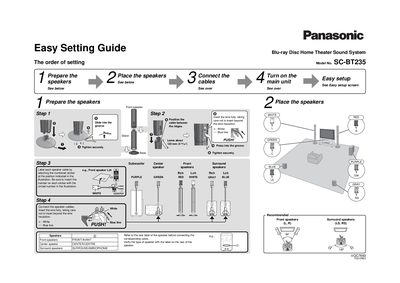

Panasonic SC-BT235 Blu-ray Disc Home Theater Sound System Easy Setting Guide - cover page
Brand
Panasonic
Category
Hi-Fi
Document type
Quick Start Guide
Language
English
Pages
2
File format
PDF
File size
716 KB
Published
03 July, 2012
Updated
01 October, 2023
MD5 checksum
ABB0C189279E9A39FDE800946D6AC55C

About this manual

This document is an easy setting guide for the Panasonic SC-BT235 Blu-ray Disc Home Theater Sound System. It outlines the initial steps required to prepare speakers, place them correctly, and connect cables before turning on the main unit.

The guide details how to label speaker cables using numbered stickers and insert wires into terminals securely. It also covers connecting various audio/video inputs including HDMI, optical digital audio, and standard audio cables, as well as setting up broadband network connections for BD-Live and VIERA CAST features.

What's inside

  • Prepare the speakers
  • Place the speakers
  • Connect the speaker cables
  • Connect the cables to main unit
  • Turn on the main unit
  • Easy setup screen

Frequently asked questions

What is the maximum voltage for connecting this unit to a household AC outlet?

The main unit should be connected to an AC outlet rated at 120 V, 60 Hz.

What color cables correspond to the Front speakers?

The Front speakers use PURPLE and GREEN cables.

Download PDF (716 KB)

More Panasonic Manuals


View all Panasonic manuals →