
This is an electronic keyboard user manual, which introduces the functions and operating methods of the electronic keyboard
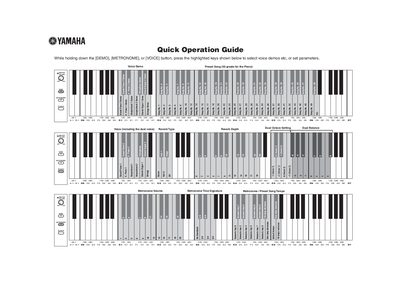
This document serves as a Quick Operation Guide for a Yamaha electronic musical instrument. It provides instructions on selecting preset songs and configuring various performance parameters by holding down specific keys while pressing others.
The guide details procedures for setting Voice Demo Presets, adjusting Metronome settings (Volume, Time Signature, Tempo), and tuning the pitch in 0.2Hz steps or resetting to standard 440.0 Hz. It also covers MIDI configuration options including Program Change, Transmit/Receive Channels, Transpose, Local Control, and Control Change.
While holding down the [DEMO], [METRONOME], or [VOICE] button, press the highlighted keys to select the desired preset.
Press any highlighted key while in the Tune Up menu to reset the pitch to 440.0 Hz.
To tune up, press any highlighted key to adjust in about 0.2Hz steps.