
Instructions on how to use the Olympus E-1 Digital camera
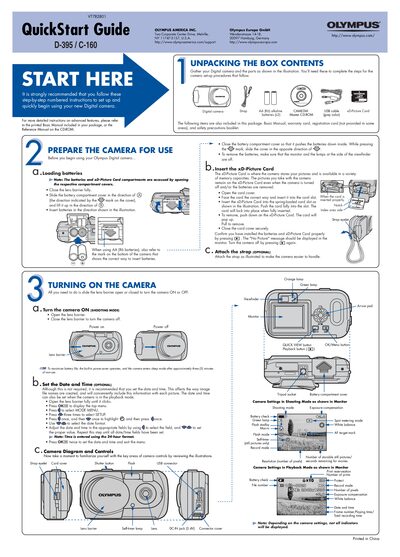
This QuickStart Guide provides step‑by‑step instructions for getting your Olympus D-395/C-160 digital camera up and running quickly. It covers unpacking, inserting batteries and the xD‑Picture Card, attaching the strap, and turning the camera on.
The guide also explains how to take pictures, zoom, use flash modes, view and erase images, connect the camera to a computer via USB, and install the bundled software. Additional features such as scene modes, macro, and movie recording are mentioned for further exploration.
| Battery type | AA (R6) alkaline (x2) |
|---|---|
| xD‑Picture Card capacity | 16 MB – 512 MB |
| Zoom magnification steps | 1.3×, 1.6×, 2.0×, 2.3× |
Open the battery compartment cover, insert two AA (R6) alkaline batteries in the direction shown, then close the cover so the batteries are pushed down.
Use the All‑Frame Erase function in the menu: select the CARD tab, choose All‑Frame Erase, and confirm with YES to delete all unprotected images.
Turn the camera off, plug the supplied USB cable into the camera and computer, the camera powers on automatically and you can select PC mode on the USB screen.