
Digital Battery Tester User Manual

This manual describes the steps involved in using the Digital Battery Tester (DBIT).
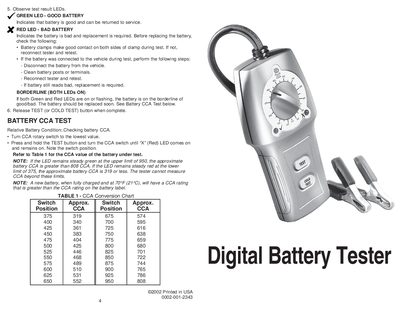

Digital Battery Tester User Manual - cover page
Brand
Digital
Document type
User Manual
Language
English
Pages
2
File format
PDF
File size
185 KB
Published
06 June, 2012
Updated
30 September, 2023
MD5 checksum
4438115437D977D37B8261440614851B

About this manual

This manual provides instructions for using the Digital Battery Tester, a diagnostic tool designed to test 12-volt lead-acid type batteries rated from 375 to 950 CCAs. The device uses discrete LED indicators—Orange for Ready, Green for Good, and Red for Replace—to display results.

What's inside

  • Safety Guidelines
  • Vehicle Preparation
  • Hookup
  • Battery Test
  • Observe test result LEDs
  • BATTERY CCA TEST
  • TABLE 1 - CCA Conversion Chart

Frequently asked questions

What is the maximum input voltage this tester can handle?

The maximum input voltage to the tester is 32 volts.

How should I set the CCA rotary switch if my battery rating falls between two positions?

If the battery CCA rating is between switch positions, use the higher position.

Which button should I press for testing a battery at 32°F or lower?

Press and hold the COLD TEST button for testing at 32°F (0°C) or lower.

Download PDF (185 KB)

More Digital Manuals


View all Digital manuals →