
This is the first steps manual for Apple Mac Pro, it introduces how to install and replace PCIe and graphics card in Mac Pro
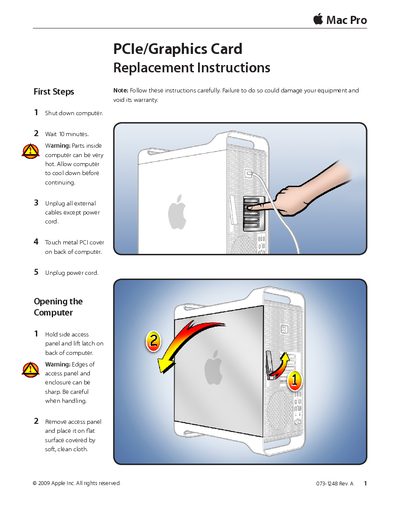
This document provides step-by-step instructions for removing and installing a PCI Express (PCIe) or graphics card in an Apple Mac Pro. It begins with essential first steps, such as shutting down the computer, waiting 10 minutes to allow internal components to cool, and unplugging external cables.
The guide details how to open the computer case by removing the side access panel using a Phillips #1 screwdriver. It then explains the specific procedure for releasing the retention bar on the PCIe fan to remove the card, along with important handling precautions to avoid damage.
You must wait 10 minutes to allow parts inside the computer to cool down.
A Phillips #1 screwdriver is required to loosen captive screws and remove the access panel.