
This document is a user guide for BendBroadband Home Wi-Fi gateway.
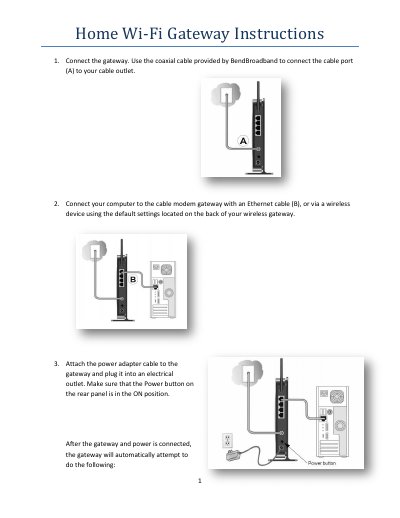
This guide explains how to connect and power the CG3000D gateway, including attaching the coaxial cable, Ethernet cable, and power adapter, and how the device automatically obtains an IP address and connects to the Internet. It also describes the LED indicators that confirm successful connection.
The manual covers optimal placement of the gateway, changing the SSID, password, and passphrase via the web‑based interface, using WPS for quick wireless setup, and detailed troubleshooting steps such as resetting the device and restoring factory defaults.
| Default SSID prefix | CG3000D |
|---|---|
| Default username | admin |
| Default password | password |
| Power LED status when on | solid green |
| Internet LED status when connected | solid green |
| Downstream/Upstream LEDs after connection | lit |
| LAN LED status | lit for active Ethernet port |
Log into the web interface, click on Wireless Settings under Setup, edit the Name(SSID) field, and click Apply.
Press the WPS button on the front of the gateway to start a 2‑minute window, then use the device’s WPS utility to connect.