
The Pax Lite RTD Meter accepts standard RTD inputs and precisely linearizes them into temperature readings. It features a selectable Fahrenheit or Celsius display with 0.1 or 1 degree resolution. The meter utilizes state-of-the-art digital electronics for greater accuracy and reliability. It also offers programmable temperature offset, digital filtering, peak/valley memory, and a sealed front bezel.
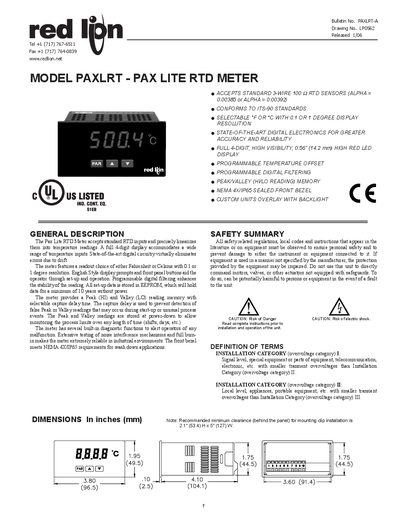
The PAXLRT PAX Lite RTD Meter provides precise temperature readings from standard RTD sensors with a 4‑digit high‑visibility LED display. It supports both Fahrenheit and Celsius scales, offers programmable digital filtering, and stores peak/valley data in EEPROM for long‑term monitoring. The unit meets NEMA 4X/IP65 standards for wash‑down environments.
This manual details ordering information, specifications, installation steps, wiring diagrams, EMC guidelines, front‑panel operation, programming procedures, calibration steps, and troubleshooting tips to ensure reliable performance in industrial applications.
| Display | 4‑digit, 0.56" (14.2 mm) high LED |
|---|---|
| Power Supply | 85‑250 VAC, 50/60 Hz, 6 VA |
| Isolation | 2300 Vrms for 1 min between input and supply |
| Resolution | 0.1 ° or 1 ° |
| Temperature Range | -199.9 °C to 850.0 °C (‑328 °F to 1562 °F) |
| Accuracy | ±0.3 °C at 23 °C |
| Reading Rate | 2.5 readings/second |
| Response Time | 2 seconds to settle for step input |
| Normal Mode Noise Rejection | 40 dB @ 50/60 Hz |
| Common Mode Noise Rejection | 120 dB, DC to 50/60 Hz |
| Enclosure Rating | NEMA 4X/IP65 indoor use |
| Weight | 0.65 lb (0.24 kg) |
Press the A and W keys simultaneously to reset both peak and valley; press and hold the € key then PAR to reset peak only, or hold W then PAR to reset valley only.
Enter Programming Mode, select the Temperature Scale parameter, and press the up or down arrow keys to choose °F or °C, then press PAR to save.
In Programming Mode, choose the Digital Filtering parameter and use the up or down arrow keys to set the level: 8 = no filtering, 2 = increased, 1 = normal, 0 = maximum filtering.
Connect the sense lead to Terminal 5 (RTD+), the common lead to Terminal 6 (RTD‑), and the excitation lead to Terminal 4 (+ Excitation). For 2‑wire sensors, short Terminals 4 and 5 if the run is under 30 ft.