
This document introduces the Storm 420 series encoders, which allow interfacing between a Storm keypad and host system using the RS232 communications protocol. This model will also drive a 4 line x 20 character LCD display.
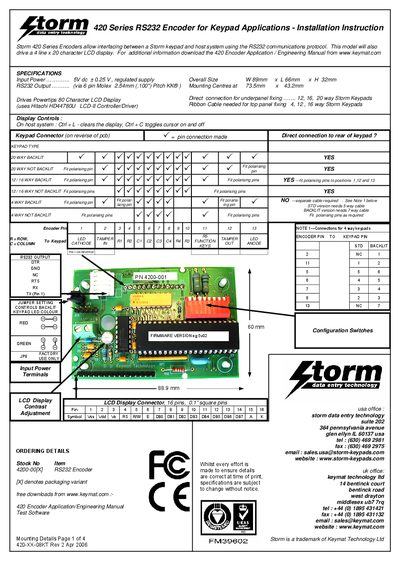
The Storm 420 Series RS232 Encoder provides RS232 communication between a Storm keypad and a host system, and can drive a 4‑line × 20 character LCD display. The encoder supports 4, 12, 16 and 20‑way keypads and includes configuration switches for baud rate, echo, and backlight settings.
The manual details power requirements, mechanical dimensions, connector pin‑outs, mounting details, and wiring diagrams for various keypad layouts (UK, US, and 6000 series). It also lists ordering information and contact details for Storm/Keymat support.
| Input Power | 5 V ± 0.25 V regulated |
|---|---|
| Overall Size | 9 mm × 66 mm × 32 mm (W × L × H) |
| RS232 Output Connector | 6‑pin Molex 2.54 mm pitch KK® |
| Mounting Centres | 73.5 mm × 43.2 mm |
It requires a regulated 5 V supply with a tolerance of ±0.25 V.
It uses the Hitachi HD44780U LCD controller/driver.