
This document is a remote control instruction manual, which introduces how to use the remote control to control TV, set-top box and other devices
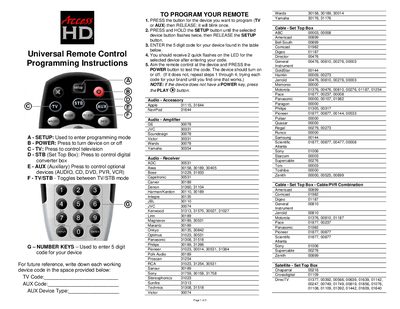
The Access HD universal remote uses the SETUP button to enter programming mode, then you select the device type (TV, AUX, etc.) and hold SETUP until the device button flashes twice. After that, enter the five‑digit code for your device from the tables provided and confirm with two quick LED flashes.
To verify the code, aim the remote at the device and press the POWER button (or PLAY® if the device lacks a POWER key). The device should turn on or off. If it does not, repeat the steps with a different code for the same brand until it works.
Press and hold the SETUP button until the selected device button flashes twice, then release the SETUP button.
Press the PLAY® button instead of POWER to test the code.
Aim the remote at the device and press the POWER (or PLAY®) button; the device should turn on or off.
The code tables for TV, AUX, audio, cable, and satellite devices are listed in the document.