
The GU140x32F-7806A is a 140x32 dot graphic VFD module from Noritake Itron with 4/8 bit parallel LCD and serial interfaces.
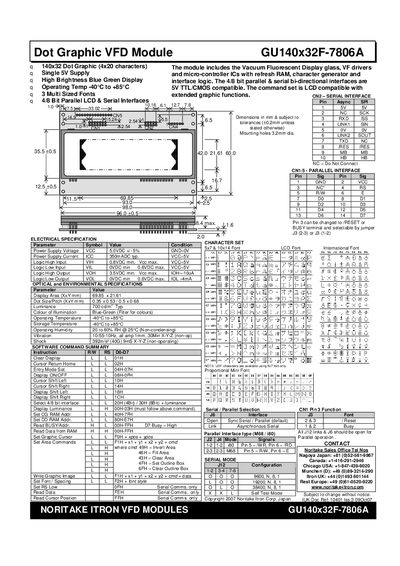
The GU140x32F-7806A is a 140 × 32 dot graphic vacuum‑fluorescent display with a blue‑green illumination. It operates from a single 5 V supply and offers both 4‑bit/8‑bit parallel and asynchronous/synchronous serial interfaces, compatible with standard LCD command sets.
The manual includes electrical and environmental specifications, a full command reference, wiring diagrams, and extended port/serial commands for custom graphics, font selection, and I/O control. It also describes LCD compatibility, reset procedures, and examples for displaying text and graphics.
| Power Supply Voltage | 5.0 VDC ±5 % |
|---|---|
| Power Supply Current | 350 mA typical |
| Logic High Input (VIH) | 0.8 VDC min |
| Logic Low Input (VIL) | 0.6 VDC min |
| Logic High Output (VOH) | 3.5 VDC min |
| Logic Low Output (VOL) | 0.6 VDC min |
| Display Area | 69.85 mm × 21.61 mm |
| Dot Size / Pitch | 0.35 mm × 0.53 mm (or 0.5 mm × 0.68 mm) |
| Luminance | 700 cd/m² typical |
| Colour of Illumination | Blue‑Green |
| Operating Temperature | -40 °C to +85 °C |
| Operating Humidity | 20 % to 80 % RH (25 °C, non‑condensing) |
| Vibration | 10‑55‑10 Hz, 1 mm, 30 min X‑Y‑Z (non‑op) |
| Shock | 392 m/s² (40 G) 9 ms X‑Y‑Z (non‑operating) |
It requires a 5.0 VDC supply with a tolerance of ±5 %.
Send the command 20H (4Bi) to select the 4‑bit interface; the display will then operate in 4‑bit mode.
Use command O1H to fill all display RAM locations with blanks, effectively clearing the screen.
The module works from –40 °C up to +85 °C.