
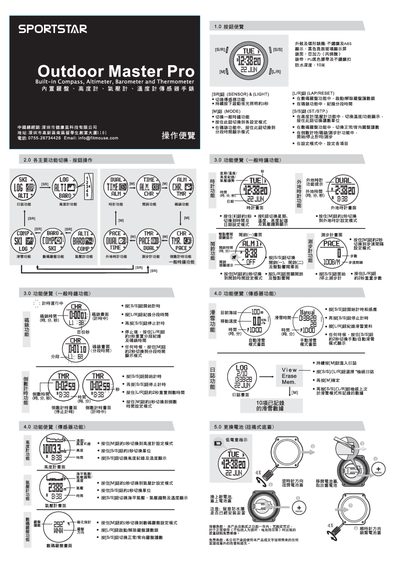
The manual describes the main button functions of the Outdoor Master Pro, including how to start, stop and reset timing, as well as how to switch between general time, altitude, temperature and step‑count modes. Detailed instructions are provided for each functional mode, with button combinations for starting, pausing, resetting and switching displays.
Additional sections cover the device’s physical specifications such as a black ABS housing, PU black strap, and a water‑resistance rating of 10 m. Instructions for battery replacement (twist‑off bottom cover) and warranty information are also included. This manual is written in Chinese.
| Water resistance depth | 10 m |
|---|---|
| Housing material | ABS |
| Strap material | PU black |
| Display type | black negative glass screen |
Press the [S/7S] button to stop timing.
Remove the twist‑off bottom cover to access the battery compartment.
The device is rated for water resistance up to 10 meters.