
This manual introduces the features, appearance, installation, system boot process, system menu introduction, etc. of DVR-4C4H-4
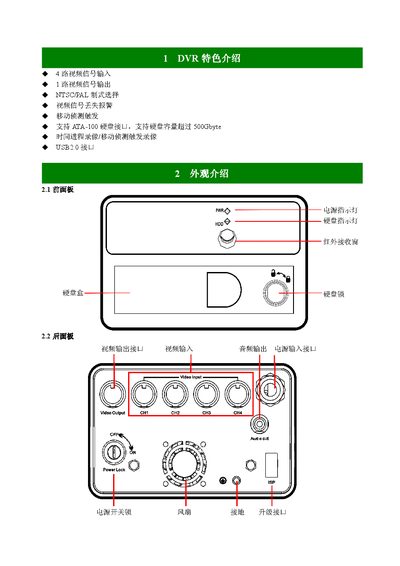
The manual describes the front and rear panel connectors, including 4 video BNC inputs, 1 audio RCA input, USB2.0, and 12 VDC power connections. It explains how to install the DVR, connect cameras and monitors, and set power polarity correctly.
It also covers menu functions for selecting video modes (PAL/NTSC), adjusting frame rates, and handling data loss or system freezes. A troubleshooting section answers common questions about slow performance, storage capacity, and video signal issues. This manual is written in Chinese.
| Supported storage interface | ATA‑100 |
|---|---|
| Maximum storage capacity | 500 GB |
| USB interface | USB 2.0 |
| Video inputs | 4 BNC channels |
| Supported video standards | PAL / NTSC |
| Power output (for external devices) | 12 VDC OUT+ / OUT- |
| Power input | 9.32 VDC IN+ / IN- |
| Internal storage capacity (example) | 400 420 MB |
Connect the four BNC video inputs, the RCA audio input, and the 12 VDC power lines, making sure the polarity is correct and never reverse the power connections.
Use the menu to select either PAL or NTSC mode under the video settings.