
This document is a installation guide for Bluetooth function of C.P43 X5 Ver2.0 motherboard. It mainly introduces how to connect the antenna, install the driver, set the Bluetooth function and pair devices.
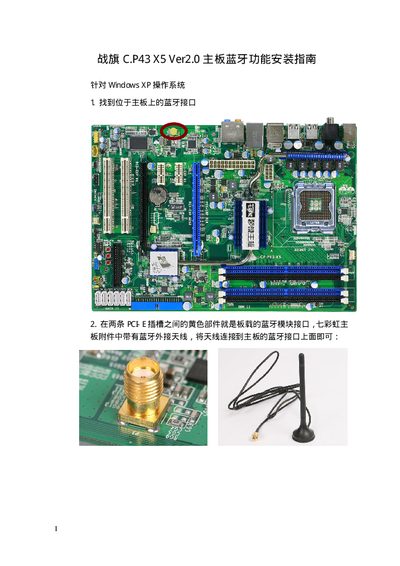
This guide explains how to connect the external Bluetooth antenna to the yellow Bluetooth module interface located between the two PCIe slots on the Colorful C.P43 X5 Ver2.0 motherboard. After hardware connection, insert the motherboard driver CD and select the "Install onboard Bluetooth driver" option to install the required drivers.
Once the driver installation finishes, the Bluetooth icon appears on the desktop and taskbar. Use the "My Bluetooth Location" shortcut or the taskbar icon to launch the Bluetooth Settings Wizard, configure device names, services, and perform file transfers between the PC and paired devices. This manual is written in Chinese.
| Supported Operating System | Windows XP |
|---|---|
| Bluetooth Module Interface | Yellow connector between two PCIe slots |
Connect the external antenna to the yellow Bluetooth module interface on the board as shown in the installation diagram.