
Allen Bradley Ethernet IP(MicroLogix, SLC500) products controller IP address, communication interface, station number, control zone/status zone, and controller Read/Write address definition
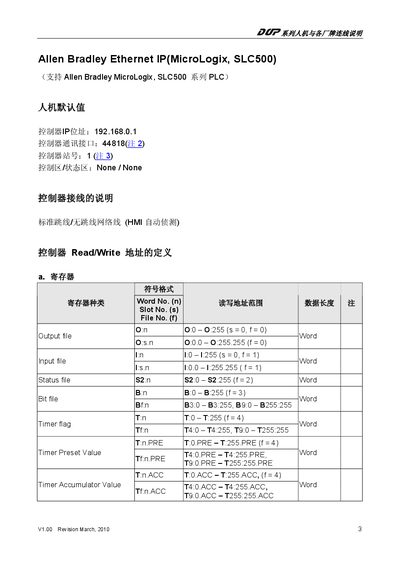
The document provides detailed information on configuring the Ethernet/IP interface of Allen Bradley MicroLogix and SLC500 programmable logic controllers. It includes default network parameters, communication interface numbers, and the required software for program download.
The manual lists the symbol format and the complete register and file mapping for output, input, status, bit, timer, counter and control files. Each file type is described with its slot and file numbers, allowing users to read and write PLC data correctly. This manual is written in Japanese.
| Default IP address | 192.168.0.1 |
|---|---|
| Communication interface number | 44818 |
| Document revision | V1.00 March 2010 |
The default IP address is 192.168.0.1.
It uses interface number 44818.
RSLogix 5000 software is required.
Output data uses O:0‑O:255 (file 0).