
3G Wireless Router User Manual, introduces the product's function features, interfaces and switches, installation guide and other information
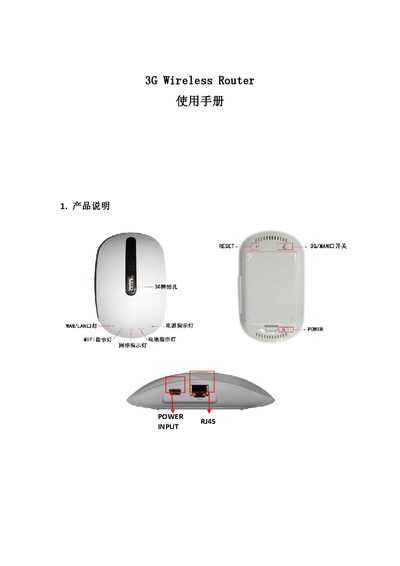
This manual covers the basic operation of the MIFI MIFI-H1 3G Wireless Router, including power and battery LEDs, WAN/LAN status lights, and the reset function. It explains how to connect the router using a 3G data card or wired Ethernet and how to switch between 3G and WAN modes.
Detailed instructions are provided for accessing the web configuration interface (default 192.168.1.17, admin/admin), configuring wireless security (WEP, WPA‑PSK, WPA2‑PSK), managing user accounts, and performing firmware upgrades. The document also lists the physical ports and supported interfaces such as a standard USB 2.0 port for 3G data cards. This manual is written in Chinese.
| USB Interface | Standard USB 2.0 |
|---|---|
| Power Input | USB or external power adapter |
| Supported Data Cards | 3G data cards (no configuration needed) |
Short‑press the RESET button to restart the gateway; long‑press to restart and restore factory settings.
Enter 192.168.1.17 in a web browser to open the router’s configuration interface.
Both the username and password are "admin" by default.
A steady green WiFi LED means the WiFi function is enabled and working.