
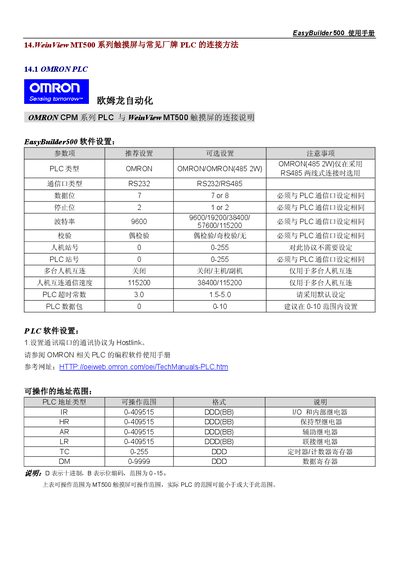
This manual describes how to configure the EasyBuilder 500 software for communication with various OMRON PLC series, including CPM, CQM and C200H/ALPHA models. It details the required Hostlink protocol settings, baud rate, data bits, stop bits, parity and station numbers.
The document also includes detailed wiring diagrams for CPU units and communication modules, pin‑out tables for RS‑232/RS‑485 connectors, and the address ranges that can be accessed by the MT500 touch screen. Hardware adapters and module configuration notes are provided for each PLC series. This manual is written in Chinese.
| Supported PLC type | OMRON |
|---|---|
| Communication port type | RS232 / RS485 |
| Baud rate | 9600 |
| Hostlink protocol | Enabled |
The communication protocol should be set to Hostlink.