
Key facts
- Manuals
- 6
- Languages
- ZH
- Last added
- 2026-10-01
Featured EasyBuilder manuals
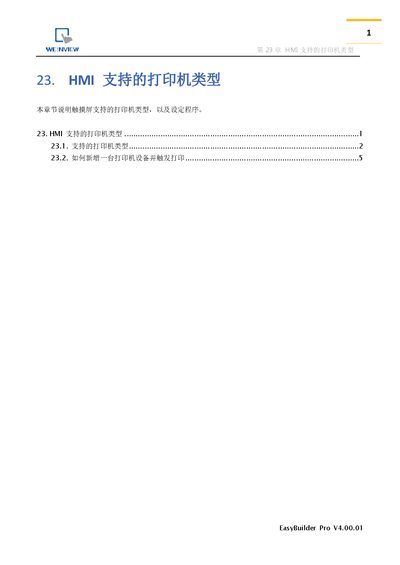
EasyBuilder Pro V4.00.01 HMI Supported Printer Types User Manual
The chapter describes the various printer drivers that the HMI can use, including SP‑M/D/E/F (EPSON ESC serial protocol), EPSON ESC/P2 series (LQ‑300 family, Stylus Photo 750, EPL‑5800), HP Computer L series (USB), Axiohm A630, SPRT, EPSON TM‑L90, EPSON TM‑T70 and several BRIGHTEK WH models. It also covers remote printing via Ethernet and the EasyPrinter utility.
Instructions are provided for adding a new printer device through the System Parameter Settings → HMI Properties page and for configuring remote print servers. Printing can be triggered directly with a Function Key component or via the PLC Control screen‑print element, using predefined address bits. This manual is written in Chinese.
Covers: Supported Printer Types · Adding a Printer Device · Triggering Print Function · Remote Print Server
EasyBuilder 8000 User Manual
This manual covers the complete workflow for using EasyBuilder 8000, starting with software installation and project creation, then moving through hardware configuration, system parameters, and window design. Detailed chapters explain event logging, data sampling, macro programming, and communication setup such as MODBUS and Ethernet/IP.
Additional sections describe printer support, recipe editing, EasyConverter utilities, and advanced features like multi‑screen operation, FTP server usage, and diagnostic tools, giving users a comprehensive reference for developing and maintaining HMI projects. This manual is written in Chinese.
Covers: Installation · Project Manager · Hardware Settings · System Parameters · Window Design · Event Log
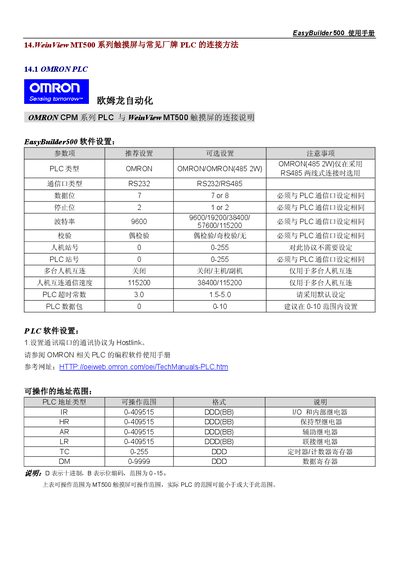
EasyBuilder 500 User Manual
This manual describes how to configure the EasyBuilder 500 software for communication with various OMRON PLC series, including CPM, CQM and C200H/ALPHA models. It details the required Hostlink protocol settings, baud rate, data bits, stop bits, parity and station numbers.
The document also includes detailed wiring diagrams for CPU units and communication modules, pin‑out tables for RS‑232/RS‑485 connectors, and the address ranges that can be accessed by the MT500 touch screen. Hardware adapters and module configuration notes are provided for each PLC series. This manual is written in Chinese.
Covers: Software Settings · Connection Methods · Wiring Diagrams · Address Range Table · Communication Modules · Pinout Diagrams
WeinView MT500 Touch Screen User Manual
This manual provides step‑by‑step instructions for setting up the EasyBuilder 500 software with the WeinView MT500 HMI. It covers communication parameter configuration, wiring diagrams, and required adapters for various PLC families.
The document details connection methods for OMRON CPM, CQM, C200H/ALPHA series and Mitsubishi FX series, including RS‑232, RS‑485 and Modbus TCP/IP options, as well as the address ranges and pinout information needed for successful integration. This manual is written in Chinese.
Covers: Connection to OMRON PLCs · Connection to Mitsubishi PLCs · Wiring diagrams · Configurable communication parameters · Supported address ranges · Modbus TCP/IP settings
Latest EasyBuilder manuals
EasyBuilder Pro V4.00.01 HMI Supported Printer Types User Manual
User Manual 8 pages · 708 KB · ZHThis EasyBuilder Pro V4.00.01 user manual chapter lists the printer types supported by the HMI and explains how to add and trigger printers.
EasyBuilder 8000 User Manual
User Manual 706 pages · 17.3 MB · ZHThe EasyBuilder 8000 User Manual provides installation, configuration, and programming instructions for the EasyBuilder 8000 HMI software.
EasyBuilder 500 User Manual
User Manual 86 pages · 1.1 MB · ZHThe EasyBuilder 500 user manual provides setup, communication settings, and wiring diagrams for connecting the HMI to OMRON PLCs.
EasyBuilder 500 Macro User Manual
EasyBuilder 500 Guide
WeinView MT500 Touch Screen User Manual
User Manual 86 pages · 1.1 MB · ZHThe WeinView MT500 Touch Screen User Manual explains how to configure EasyBuilder 500 and connect the display to OMRON, Mitsubishi and other PLCs.
Which document do I need?
User Manual
Day-to-day operation, settings and troubleshooting. Start here if the product is already set up.
Questions answered in EasyBuilder manuals
How do I add a new printer device to the HMI?
Select the desired printer model in System Parameter Settings → HMI Properties and set the required communication parameters; enable the Print/Backup Server page if using a remote server.
From: EasyBuilder Pro V4.00.01 HMI Supported Printer Types User Manual
How do I install EasyBuilder 8000?
Refer to Chapter 1, sections 1.1 and 1.2 for installation steps and procedures.
How can I configure the HMI as a MODBUS device?
Chapter 19 explains how to set the HMI to MODBUS Server mode and configure address mapping.
What communication protocol must be set for EasyBuilder500 to talk to OMRON PLCs?
The communication protocol should be set to Hostlink.
How should the communication protocol be set in EasyBuilder 500?
Set the communication protocol to Hostlink in the EasyBuilder 500 software.
Which adapter is required for OMRON CPM1 series PLCs without a standard serial port?
Use the OMRON CPM1‑CIF01 (RS232) or CPM1‑CIF11 (RS422) communication adapter.