
Philips phone user manual, introduces the phone's power on, power off, lock screen, unlock, dial phone, answer phone, end call, view new SMS, view unanswered calls, view call logs, open start menu, access the Internet, view task management, change the scene mode, quickly return to the standby screen, select the input method, display the today screen, add application icons, delete added application icons, set the today screen and other functions
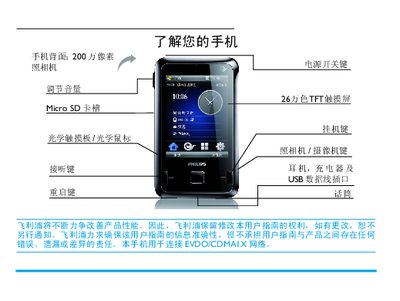
This manual provides step‑by‑step instructions for using the Philips D900 smartphone, covering basic functions such as powering on/off, making calls, adjusting volume, and navigating the Today screen. It also details advanced features like setting up ActiveSync, managing contacts, and using multimedia applications.
Additional sections describe safety information, SAR compliance, warranty terms, and environmental specifications, helping users keep the device safe and compliant with regulations. This manual is written in Chinese.
| Camera resolution | 2 MP |
|---|---|
| Display colors | 260,000 colors |
| Memory card slot | Micro SD |
| SAR (head) value | 0.245 W/kg |
| Battery warranty | 6 months |
Press and hold the power key at the top of the phone.
Slide the side volume keys up or down.
The maximum SAR value is 0.245 W/kg, which meets the national standard GB21288‑2007.
The charger is covered for one year.