
This document introduces the user requirements and usage of Siemens LOGO+EIB lighting power automatic switching system. The system can automatically switch the lighting circuit in the building from A power supply to B power supply when A power is disconnected, and the lighting circuit can be controlled by EIB panel or LOGO switch input.
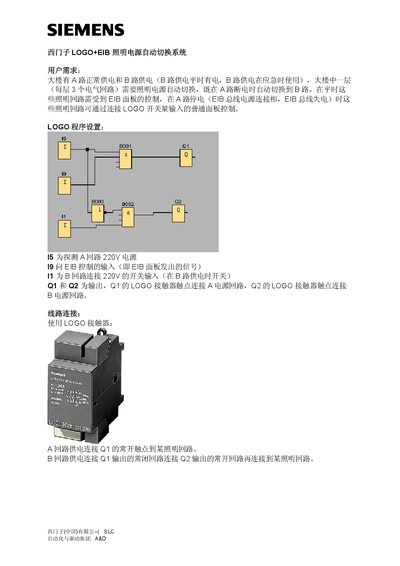
The document describes an automatic switching system for building illumination that alternates between a normal A‑supply and a backup B‑supply. When the A‑supply is lost, the system automatically switches to the B‑supply, and lighting circuits can also be controlled via an EIB panel.
It provides wiring details, a parts list with Siemens component numbers, and instructions for connecting LOGO contacts (Q1 for the A‑circuit and Q2 for the B‑circuit). The manual includes the required power supplies (220 V for A and B circuits, 24 V for LOGO) and the corresponding part numbers. This manual is written in Chinese.
| A‑circuit supply voltage | 220 V |
|---|---|
| LOGO control voltage | 24 V |
The system automatically switches to the B‑supply.
Q1 is wired to the A‑circuit and Q2 to the B‑circuit.