
This is a user manual for a U disk reader/writer with RS232 interface. The reader/writer can transfer data to and from a U disk through the RS232 bus, and it is mainly designed as an external mass storage device. It has a simple serial port three-wire connection and a baud rate of 57600bps. It is fully compatible with FAT16 and FAT32 U disk file formats.
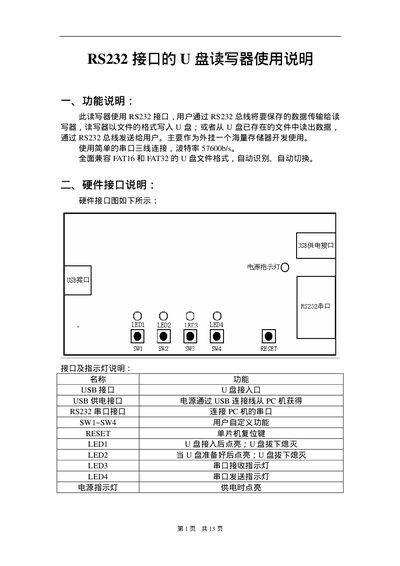
The U Plate is a USB flash drive reader/writer that connects to a host PC via an RS232 serial interface. Data is transferred over the RS232 bus at a baud rate of 57600 bps, and the device writes files to the flash drive in FAT16 or FAT32 format.
The manual describes the hardware connections (USB power, RS232 port, LEDs, reset key), the command protocol (command codes, data lengths, response format), and procedures for file operations such as opening, reading, writing, creating, and deleting files or directories. This manual is written in Chinese.
| Baud Rate | 57600 bps |
|---|---|
| Supported File Systems | FAT16, FAT32 |
| Maximum Write Length per Command | 2048 bytes |
| Power Supply | USB power from PC |
The device communicates at a baud rate of 57600 bps.
A single write command can transfer up to 2048 bytes of data.
Send command 0x08; the device will respond with a result indicating whether the flash drive is ready.
Do not remove the USB flash drive until the indicator stops flashing, otherwise data may be lost or corrupted.