
This document is the installation instructions for the Epson EPL-6200 printer, which introduces the printer's accessories, installation methods, and usage methods
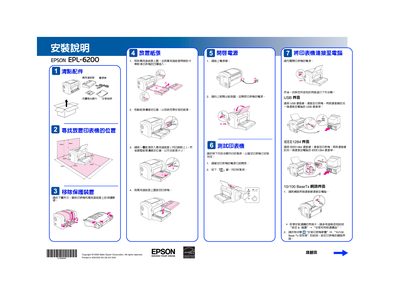
This guide walks you through unpacking the Epson EPL-6200, installing the paper tray, connecting power, and positioning the printer safely. It also covers connecting the printer to a computer via USB, IEEE1284, or 10/100 Base‑Tx network interfaces.
After hardware setup, the manual details driver installation for Windows and Mac OS, network configuration using EpsonNet utilities, and safety precautions for laser operation and ozone emission. Technical specifications such as resolution, power consumption, and supported operating systems are listed at the end. This manual is written in Chinese.
| Resolution | 1200 dpi |
|---|---|
| Power Consumption (printing) | 372 W (average) |
| Input Voltage | 110‑120 V ±10 % |
| Frequency | 50‑60 Hz ±3 Hz |
| Input Current | 8.0 A |
| Laser Type | Semiconductor laser scanning |
| Supported Operating Systems | Windows Me/95/98/2000/XP/NT4.0, Mac OS 8.6+ (USB 1.1) |
Connect the USB cable to the printer and then plug the other end into the computer’s USB port.
The recommended ozone concentration is 0.1 ppm over an 8‑hour period.