
FOT-700 optical fiber loss tester is a portable optical loss tester for measuring optical fiber attenuation, return loss and crosstalk. The instrument is equipped with adjustable light source power level, 1625 nm laser, automatic wavelength recognition, lower price, flexible configuration, automatic increment name marking, visible fault locator and other functions.
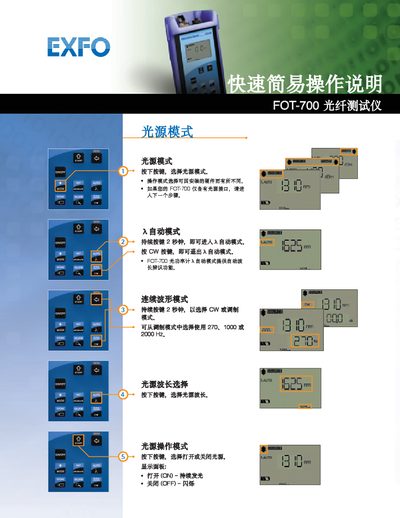
This guide provides brief instructions for operating the FOT-700 fiber optic tester. It covers how to select light‑source modes, choose operating modes, and use the automatic and continuous‑wave functions.
Key functions include selecting the light‑source wavelength, turning the light source on or off, and interpreting the display panel indicators. The steps are designed for fast setup and easy use in field measurements. This manual is written in Chinese.
Press and hold the CW button for 2 seconds to enter automatic mode.
Press the CW button to exit automatic mode.
Press the button to select the light source wavelength.