
This document is the DeviceNet communication module installation manual, which introduces the panel appearance, network wiring, mounting method, power supply, LED indicator display, etc. of the module
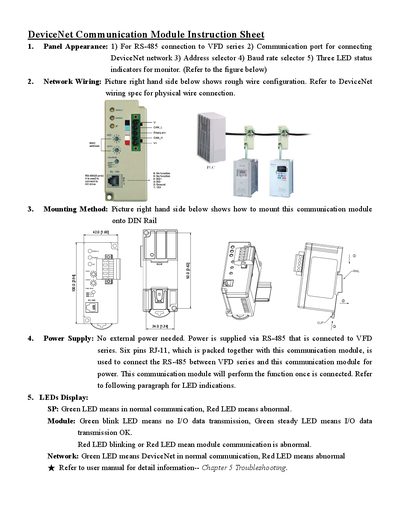
The guide describes the panel appearance of the Delta 1.65 communication module, including the RS‑485 connection to the VFD series, address and baud‑rate selectors, and three LED status indicators (SP, Module, Network). It provides a wiring diagram and references the DeviceNet wiring specification for proper network connections.
Mounting instructions show how to secure the module on a DIN rail. Power is supplied directly from the VFD series via the RS‑485 interface using a six‑pin RJ‑11 connector, so no external power source is required. LED behavior is explained: green indicates normal operation, red indicates an abnormal condition, and blinking patterns convey data transmission status. This manual is written in Chinese.
| Power Supply | Powered via RS‑485, no external power needed |
|---|---|
| Interface Connector | 6‑pin RJ‑11 connector for RS‑485 communication |
| LED Indicators | Three LEDs (SP, Module, Network) showing status with green/red colors |
The module receives power through the RS‑485 interface from the VFD series and does not require an external power supply.
Green LEDs mean normal communication; red LEDs indicate an abnormal condition. Blinking patterns on the Module LED show whether I/O data is being transmitted.