
This is an instruction sheet for the 2006-09-27 5011649800-DNS0 DeviceNet Communication Module (CME-DN01). It provides information about the module's appearance, dimensions, wiring and settings, and power supply method.
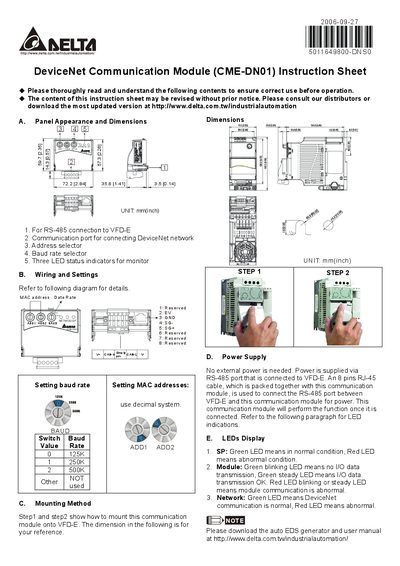
This instruction sheet describes the Delta CME‑DN01 DeviceNet communication module, a compact unit designed to connect to VFD‑E drives via an RS‑485 interface.
It details the panel dimensions, wiring connections, mounting steps, power supply method (powered through the RS‑485 port), and the meaning of the three status LEDs.
| Panel dimensions | 72.2 mm × 57.3 mm × 14.3 mm |
|---|---|
| Supported baud rates | 125 kbaud, 250 kbaud, 500 kbaud |
| Power supply | Powered via RS‑485 port, no external power required |
| LED status indicators | Three LEDs indicate SP, Module, and Network status |
It receives power through the RS‑485 connection using an 8‑pin RJ‑45 cable; no external power supply is needed.
Set the baud rate selector switch: position 0 = 125 kbaud, 1 = 250 kbaud, 2 = 500 kbaud.
The SP LED shows normal (green) or abnormal (red) condition; the Module LED shows I/O data status (green blinking = no data, green steady = OK, red = abnormal); the Network LED shows DeviceNet status (green = normal, red = abnormal).