
Key facts
- Manuals
- 3
- Languages
- EN · ZH
- Last added
- 2012-02-20
Featured DeviceNet manuals
RKC COM-JH DeviceNet Communication Converter Instruction Manual
This manual describes the features, package contents, model code, and system configuration of the RKC COM-JH DeviceNet Communication Converter. It explains how the converter connects an RKC SRZ controller to a programmable controller (PLC) on a DeviceNet network, acting as a slave device.
The document covers handling procedures, mounting options, wiring instructions, device settings, communication methods, data lists, usage examples, troubleshooting steps, and technical specifications. Safety warnings, cautions, and regulatory compliance notes are also included.
Covers: Checking the Product · Model Code · Parts Description · Handling Procedures · Mounting · Wiring
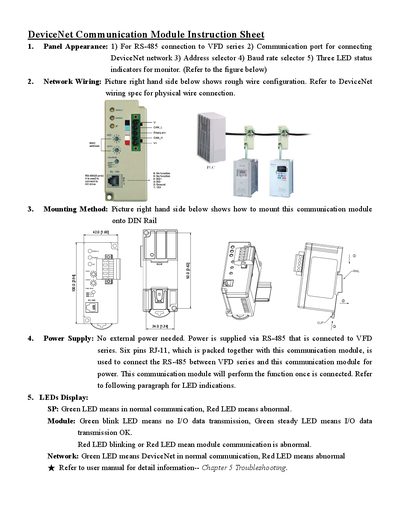
Delta 1.65 Communication Module Installation Guide
The guide describes the panel appearance of the Delta 1.65 communication module, including the RS‑485 connection to the VFD series, address and baud‑rate selectors, and three LED status indicators (SP, Module, Network). It provides a wiring diagram and references the DeviceNet wiring specification for proper network connections.
Mounting instructions show how to secure the module on a DIN rail. Power is supplied directly from the VFD series via the RS‑485 interface using a six‑pin RJ‑11 connector, so no external power source is required. LED behavior is explained: green indicates normal operation, red indicates an abnormal condition, and blinking patterns convey data transmission status. This manual is written in Chinese.
Covers: Panel Appearance · Network Wiring · Mounting Method · Power Supply · LED Display
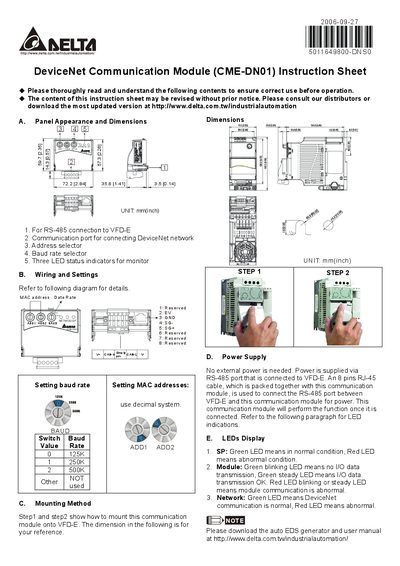
Delta CME-DN01 Communication Module Instruction Manual
This instruction sheet describes the Delta CME‑DN01 DeviceNet communication module, a compact unit designed to connect to VFD‑E drives via an RS‑485 interface.
It details the panel dimensions, wiring connections, mounting steps, power supply method (powered through the RS‑485 port), and the meaning of the three status LEDs.
Covers: Panel Appearance and Dimensions · Wiring and Settings · Mounting Method · Power Supply · LEDs Display
Latest DeviceNet manuals
RKC COM-JH DeviceNet Communication Converter Instruction Manual
User Manual 126 pages · 2.3 MB · ENThe RKC COM-JH DeviceNet Communication Converter instruction manual provides installation, wiring, configuration, and troubleshooting guidance.
Delta 1.65 Communication Module Installation Guide
Installation Guide 2 pages · 312 KB · ZHInstallation guide for Delta 1.65 DeviceNet communication module, covering panel layout, wiring, mounting, power and LED status indicators.
Delta CME-DN01 Communication Module Instruction Manual
User Manual 2 pages · 764 KB · ENThe Delta CME-DN01 Communication Module manual provides panel dimensions, wiring, mounting, power supply, and LED status information for DeviceNet integration.
Which document do I need?
User Manual
Day-to-day operation, settings and troubleshooting. Start here if the product is already set up.
Installation Guide
Mounting, wiring and first power-up. Read it before the hardware goes in.
Questions answered in DeviceNet manuals
How many modules can be connected to the COM-JH?
Up to 31 Z‑TIO and Z‑DIO modules can be connected to a single COM‑JH.
From: RKC COM-JH DeviceNet Communication Converter Instruction Manual
What power supply does the COM-JH require?
The COM-JH operates from a 24 V DC power supply.
From: RKC COM-JH DeviceNet Communication Converter Instruction Manual
How is the Delta 1.65 communication module powered?
The module receives power through the RS‑485 interface from the VFD series and does not require an external power supply.
What do the LED colors indicate on the module?
Green LEDs mean normal communication; red LEDs indicate an abnormal condition. Blinking patterns on the Module LED show whether I/O data is being transmitted.
How is the CME‑DN01 powered?
It receives power through the RS‑485 connection using an 8‑pin RJ‑45 cable; no external power supply is needed.
From: Delta CME-DN01 Communication Module Instruction Manual
How do I select the communication baud rate?
Set the baud rate selector switch: position 0 = 125 kbaud, 1 = 250 kbaud, 2 = 500 kbaud.
From: Delta CME-DN01 Communication Module Instruction Manual