
The U CAN starter kit is a full-function evaluation platform for the Infineon XC164CM 16-bit microcontroller. The kit has a USB interface, which can be conveniently connected to a laptop or PC, and also comes with a HITEX HiTop debugger and an XC166 compiler.
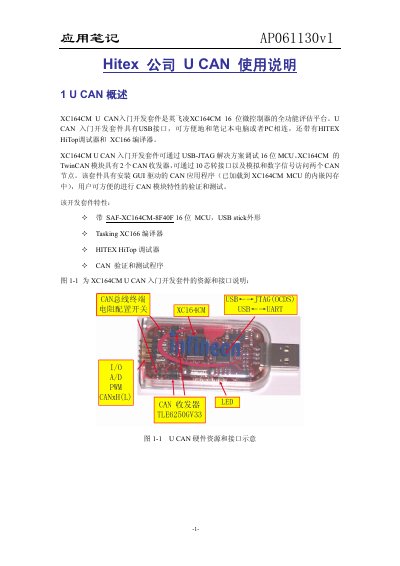
The XC164CM U CAN development kit is a full‑function evaluation platform for Infineon’s 16‑bit XC164CM microcontroller. It provides a USB‑stick form factor, a Hitex HiTop debugger, and the Tasking XC166 compiler, allowing easy connection to a PC and verification of the CAN module features.
The note describes how to install the HiTop and UCAN SmartView tools, run example programs, configure a virtual COM port, and connect external hardware. It also includes a complete example that demonstrates CAN communication, ADC readings, and LED output using the kit’s 10‑pin header. This manual is written in Chinese.
| Microcontroller | 16‑bit XC164CM MCU |
|---|---|
| Interface | USB‑stick form factor |
| CAN transceivers | 2 CAN transceivers (TwinCAN module) |
| Connector | 10‑pin header for I/O signals |
| Debugger | Hitex HiTop debugger |
| Compiler | Tasking XC166 compiler |
Insert the supplied CD, run “start.htm”, and click “Getting Started” to install the HiTOP and UCAN SmartView tools.
Open the Windows Device Manager and locate the virtual COM port assigned to the U CAN device.
Run HyperTerminal (or another terminal program) and configure COM3 using the settings shown in the manual’s figures.