
Key facts
- Manuals
- 2
- Languages
- ZH
- Last added
- 2012-03-22
Featured Hitex manuals
Hitex XC164CM U CAN Application Note
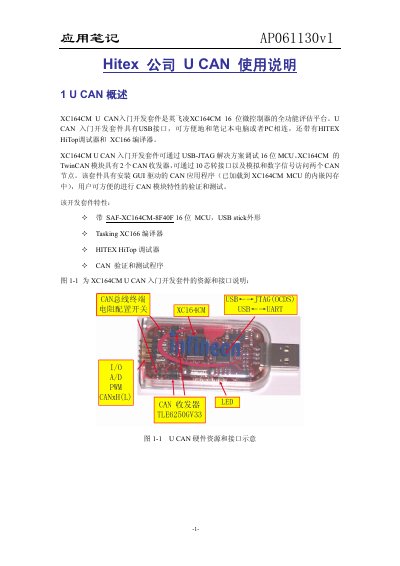
The XC164CM U CAN development kit is a full‑function evaluation platform for Infineon’s 16‑bit XC164CM microcontroller. It provides a USB‑stick form factor, a Hitex HiTop debugger, and the Tasking XC166 compiler, allowing easy connection to a PC and verification of the CAN module features.
The note describes how to install the HiTop and UCAN SmartView tools, run example programs, configure a virtual COM port, and connect external hardware. It also includes a complete example that demonstrates CAN communication, ADC readings, and LED output using the kit’s 10‑pin header. This manual is written in Chinese.
Covers: U CAN Overview · Installation of HiTOP and UCAN SmartView · Using HiTOP Example Programs · Application Example · External Hardware Configuration · External CAN Communication
Latest Hitex manuals
Hitex LPC1850 Eval Board UserManual
This document describes the jumpers and connectors on the NXP LPC1850EVA-A2 evaluation board developed by Hitex.
Hitex XC164CM U CAN Application Note
Application Note 11 pages · 1.1 MB · ZHThe Hitex XC164CM U CAN application note explains setup, software tools, and example projects for the development kit.
Which document do I need?
Application Note
How to use the product for one specific task, with worked examples.
Questions answered in Hitex manuals
How do I install HiTOP and UCAN SmartView?
Insert the supplied CD, run “start.htm”, and click “Getting Started” to install the HiTOP and UCAN SmartView tools.
How can I find the virtual COM port number for the U CAN device?
Open the Windows Device Manager and locate the virtual COM port assigned to the U CAN device.