
EMS TopGun installation instructions, introducing TopGun's interface, connection method, LED stand installation method and other content
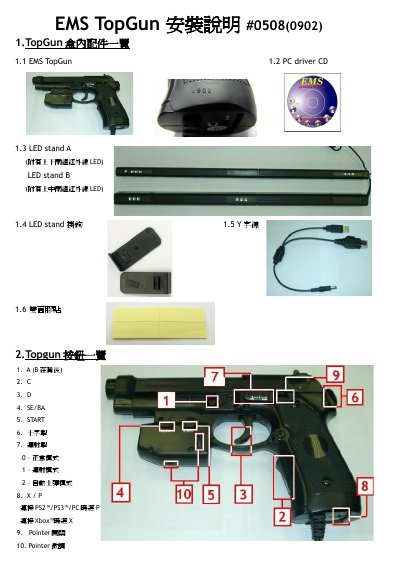
This manual explains how to set up the EMS TopGun gaming gun, including the box contents, button layout, and wiring for PC, PS2/PS3 or Xbox. It also details the LED stand mounting options and power requirements.
Step‑by‑step instructions cover connecting the gun to consoles, installing the Windows driver, calibrating the device for accurate aiming, and using the debug function to locate infrared interference. Safety notes and troubleshooting tips are provided at the end. This manual is written in Chinese.
| AC‑DC transformer requirement | 600mA or above, 5V |
|---|
Download the latest driver from the EMS website, unzip the file, connect the gun, and follow the Windows installation wizard.
Set the pointer switch to ON, aim the gun at each LED stand point, then press A and B for 5‑10 seconds to enter calibration mode and follow the on‑screen steps.
An external AC‑DC transformer delivering at least 600 mA at 5 V can be used when a USB port is not available.
Connect TopGun to a PC, run the LCDImage program, and view the infrared image to locate any white spots indicating interference sources.