
Key facts
- Manuals
- 4
- Languages
- ZH
- Last added
- 2012-06-01
Featured EMS manuals
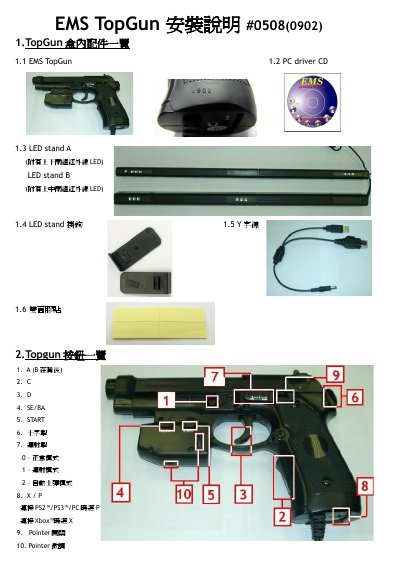
EMS TopGun #0508(0902) Installation Manual
This manual explains how to set up the EMS TopGun gaming gun, including the box contents, button layout, and wiring for PC, PS2/PS3 or Xbox. It also details the LED stand mounting options and power requirements.
Step‑by‑step instructions cover connecting the gun to consoles, installing the Windows driver, calibrating the device for accurate aiming, and using the debug function to locate infrared interference. Safety notes and troubleshooting tips are provided at the end. This manual is written in Chinese.
Covers: Box contents and accessories · Button overview · Interface connections · LED stand installation · Driver installation · Calibration procedure
EMS TopGun II Installation Guide
This guide covers the contents of the EMS TopGun II package, wiring diagrams and connection methods for PC, PS2, PS3 and Xbox. It explains how to attach the LED stands, power the unit and configure the appropriate mode (P for PC/PS3, X for Xbox).
The document also details driver installation from EMS’s website, how to run the TopGunPanel software, and the calibration procedure to ensure accurate aiming. Safety notes and a debug function for detecting infrared interference are included. This manual is written in Chinese.
Covers: Package Contents · Connection Overview · Installation Instructions · LED Stand Installation · Driver Installation · Calibration Procedure
Latest EMS manuals
EMS CPC-PCI/CC770 user manual
This document describes the user manual of EM Thomas Wünsche S CAN-PC interface CPC-PCI/CC770. The product is a CAN interface for industrial applications, with a compact size for PCI slots and compliant with CiA DS 102 and ISO 11898 standards for physical layer.
EMS TOP GUN III User Manual
EMS TopGun #0508(0902) Installation Manual
Installation Guide 6 pages · 696 KB · ZHInstallation guide for the EMS TopGun gaming peripheral, covering hardware setup, LED stand mounting, driver installation, calibration and debugging.
EMS TopGun II Installation Guide
Installation Guide 6 pages · 681 KB · ZHStep‑by‑step installation, driver setup and calibration instructions for the EMS TopGun II light gun.
Which document do I need?
Installation Guide
Mounting, wiring and first power-up. Read it before the hardware goes in.
Questions answered in EMS manuals
How do I install the TopGun driver on a PC?
Download the latest driver from the EMS website, unzip the file, connect the gun, and follow the Windows installation wizard.
How is TopGun calibrated?
Set the pointer switch to ON, aim the gun at each LED stand point, then press A and B for 5‑10 seconds to enter calibration mode and follow the on‑screen steps.
How do I install the driver for the EMS TopGun II?
Download the latest driver from EMS’s website (http://wwwrhkems.com/chinese/download%20-%20TopGun.htm) and follow the on‑screen installation steps.
Which consoles are supported by the TopGun II?
The TopGun II works with PC, PS2, PS3 and Xbox; on PS2/PS3 it supports the GunCon2 controller.