
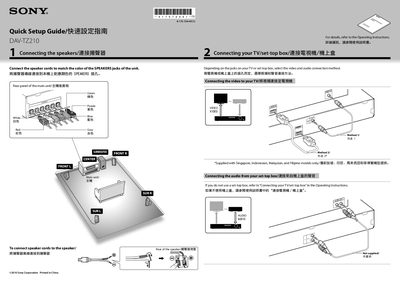
The guide walks you through connecting the speaker cables to the matching colored jacks, linking the TV or set‑top box via video and audio connections, and powering on the system. After turning on the main unit and TV, select the "SONY Home Theatre System" input on the TV.
Next, use the on‑screen menu to set language, aspect ratio, HDMI mode, and speaker formation. The setup completes with optional PRO LOGIC and surround settings, ready for normal use.
| HDMI Control | ON |
|---|
Connect the speaker cords to match the color of the speaker jacks on the unit.
Use the on‑screen menu to choose English, Chinese 1, Chinese 2, or Thai.
Connect the AC power cord, turn on the main unit and TV, select the Home Theatre input, then set language, aspect ratio, HDMI mode, and speaker formation.