
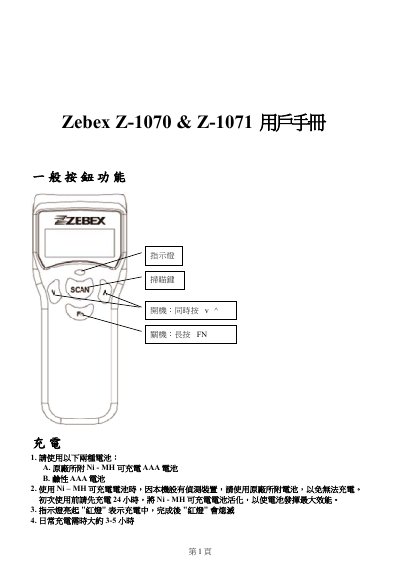
This is a short illustrated user manual for the Zebex Z-1070 / Z-1071 barcode scanner. It walks through charging the unit, then using the SCAN key to open the on-screen menu and run the tasks shown there, such as reading a barcode, showing stored records, checking a barcode and clearing all data.
The procedures are given as numbered steps with pictures of the scanner display (for example "Z-1071 VER. 2.32 / SCAN key to Menu / Free Mem: 63K"). The manual also covers the battery types that can be used, the first-time charge, the charging indicator and the normal charging time. This manual is written in Chinese.
| Battery type | Supplied rechargeable Ni-MH AAA batteries or alkaline AAA batteries |
|---|---|
| First-time charging | 24 hours before first use (Ni-MH batteries) |
| Normal charging time | About 3-5 hours |
| Free memory shown on display | 63K |
| Firmware version shown on display | Z-1071 VER. 2.32 |
Use the supplied Ni-MH AAA rechargeable batteries, or alkaline AAA batteries. Charge for 24 hours before first use; the indicator is red while charging and goes out when charging is complete.
Press the SCAN key to enter the menu, select "1.Run Task", then select "1.READ", hold the SCAN key down and read the barcode.
Press SCAN for the menu, select "1.Run Task" and then "2.SHOW". The last stored record is shown with its date and time, and the arrow keys move through the stored records.