
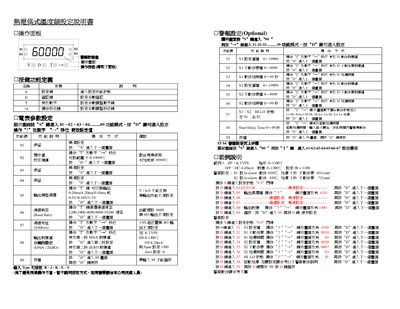
The document provides step‑by‑step instructions for navigating the operation panel, setting alarm thresholds, and adjusting parameter values such as start‑delay time and action delay. It also describes the communication settings, including baud‑rate options and command codes for reading or writing controller parameters.
Additional sections cover the data format used in communication, the meaning of each command code, and the behavior of alarm actions (high alarm, low alarm) with examples of input signal conditions and corresponding relay responses. This manual is written in Chinese.
| Action delay range | 0–99 seconds |
|---|---|
| Supported baud rates | 1200, 2400, 4800, 9600, 19200 |
Press the “D7” key to move to the next screen, then follow the on‑screen prompts to adjust the alarm settings.
The start‑delay time can be set from 0 to 99 seconds.
The device supports baud rates of 1200, 2400, 4800, 9600, and 19200.