
Key facts
- Manuals
- 6
- Languages
- ZH
- Last added
- 2012-07-06
Featured 用户手册 manuals

Lenovo L2440p Monitor User Manual
This manual covers everything needed to get the Lenovo L2440p LCD monitor up and running, including packaging contents, safety information, and step‑by‑step installation instructions. It explains how to connect the monitor to a computer via analog, DVI, and USB cables and how to power the unit safely.
The guide also details the various adjustment options—tilt, rotation, height, and pivot—along with recommended ergonomic settings. A full specification table lists dimensions, VESA mount details, power requirements, native resolution, and environmental limits, while the appendix provides service contacts and regulatory information. This manual is written in Chinese.
Covers: Safety Information · Packaging Contents · Product Overview · Adjustment and Use · Installation · Image Adjustment
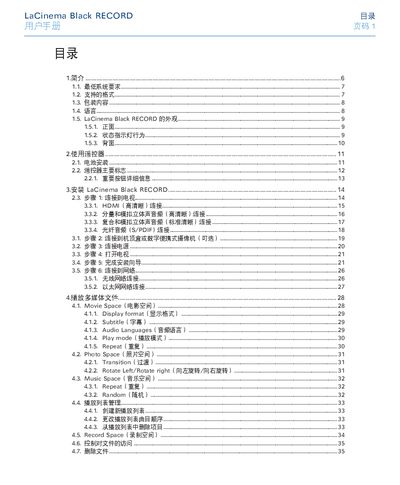
LaCie Black RECORD Media Player User Manual
This manual provides step‑by‑step instructions for installing the LaCie Black RECORD media player, using the remote control, connecting video and audio cables, and configuring network settings. It also covers supported media formats, recording functions, and firmware updates.
Safety warnings, warranty information, and contact details for LaCie technical support are included, along with a troubleshooting guide for common audio, video and file‑compatibility issues. This manual is written in Chinese.
Covers: Introduction · Remote Control Usage · Installation · Media Playback · External Source Playback and Copy · Video Capture
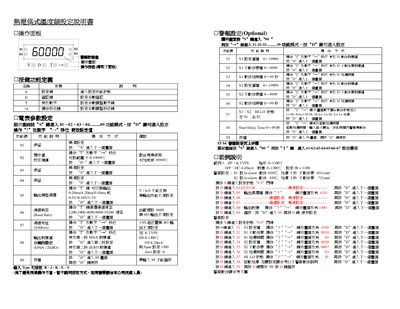
User Manual
The document provides step‑by‑step instructions for navigating the operation panel, setting alarm thresholds, and adjusting parameter values such as start‑delay time and action delay. It also describes the communication settings, including baud‑rate options and command codes for reading or writing controller parameters.
Additional sections cover the data format used in communication, the meaning of each command code, and the behavior of alarm actions (high alarm, low alarm) with examples of input signal conditions and corresponding relay responses. This manual is written in Chinese.
Covers: Operation Panel Navigation · Alarm Settings · Parameter Value Ranges · Communication Settings · Command Codes and Data Format · Alarm Action Description
Huiyu MX80D6 Communication System User Manual
This manual describes the Huiyu MX80D6 fusion communication system, an all‑in‑one solution that integrates IP, PSTN, and digital networks with features such as call routing, voicemail, IVR, and video calling. It provides detailed information on system architecture, supported protocols, and typical deployment scenarios.
The guide includes step‑by‑step instructions for initial setup, browser configuration, number planning, call‑queue editing, and system maintenance, helping administrators configure and manage the platform efficiently. This manual is written in Chinese.
Covers: Product Overview · System Features · System Configuration Guide · Numbering Rules · IE Browser Settings · Login Procedure
Latest 用户手册 manuals
user\'s manual(5)
This document is a user guide that provides detailed instructions about the projector. Users can read the guide in different languages through the Adobe Acrobat pdf file on the enclosed CD. The guide includes the features and characteristics of the product, as well as important instructions to be followed before using the projector.
user\'s manual(4)
Lenovo L2440p Monitor User Manual
User Manual 31 pages · 1.5 MB · ZHThe Lenovo L2440p monitor user manual provides setup, adjustment, connection, and specifications for the LCD display.
LaCie Black RECORD Media Player User Manual
User Manual 55 pages · 8.3 MB · ZHThe LaCie Black RECORD user manual explains setup, remote control use, media playback, network connection and troubleshooting.
User Manual
User Manual 2 pages · 114 KB · ZHThis manual explains how to configure the operation panel, alarm settings, and communication parameters of the device.
Huiyu MX80D6 Communication System User Manual
User Manual 88 pages · 3.6 MB · ZHUser manual for the Huiyu MX80D6 fusion communication system covering installation, configuration, and operation.
Which document do I need?
User Manual
Day-to-day operation, settings and troubleshooting. Start here if the product is already set up.
Questions answered in 用户手册 manuals
What connection provides the best video quality?
Use the HDMI cable that comes with the device for the highest video quality.
Why is there no audio during playback?
Make sure the audio cables are correctly connected and the file uses a supported audio codec.
How do I enter the next screen to set alarm parameters?
Press the “D7” key to move to the next screen, then follow the on‑screen prompts to adjust the alarm settings.
From: User Manual
What is the allowable range for the start‑delay time?
The start‑delay time can be set from 0 to 99 seconds.
From: User Manual
What is the default voicemail number?
The default voicemail number is 1258, which matches the extension number.
How should the Internet Explorer browser be configured for the system?
Use IE 7.0 or newer, then adjust settings as shown in the manual (disable temporary files, cookies, and set history to keep pages for 5 days).